Project detail
Cleanup Mode - Review Points
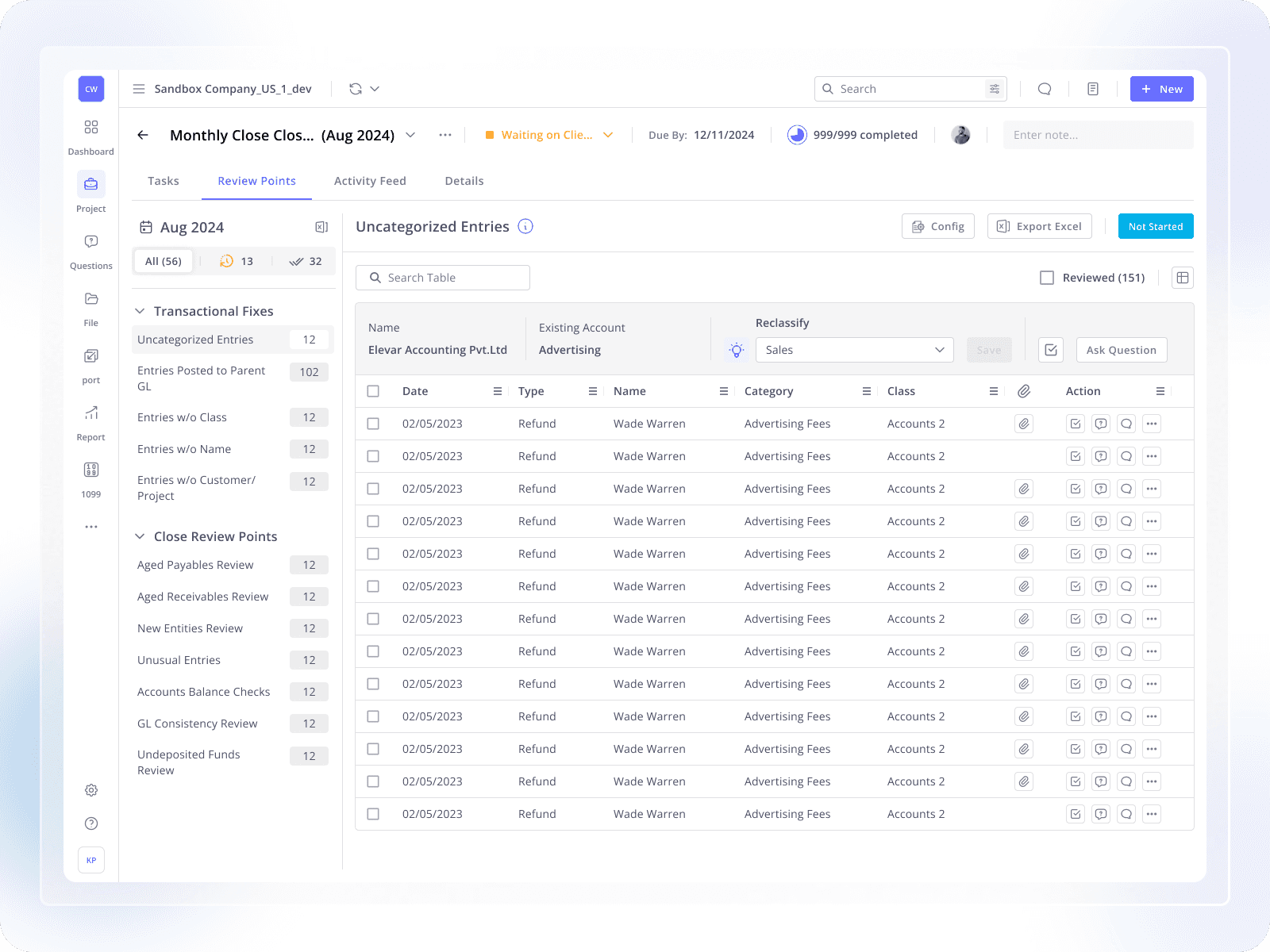
Cleanup Mode helps accountants quickly find and fix errors, saving time and improving accuracy.
Web Design
1 Years
Xenett
Project Overview
My Role: Product Designer
Industry: Fintech, Accounting
Cleanup Mode is a module in Xenett 2.0 that helps accountants find, review, and fix errors in their books quickly and accurately.
Accountants deal with large volumes of transactions every day. Even small errors can delay reports, tax filing, and client delivery. Cleanup Mode was redesigned to reduce manual effort, save time, and improve accuracy.
Context
Accountants spend several hours each day manually entering and reviewing data from receipts, invoices, and bank statements. Ensuring that every transaction is correctly categorized and error-free is a slow, repetitive, and mentally exhausting process.
This case study explores how we redesigned Cleanup Mode, a feature module in Xenett 2.0, to make the cleanup and review process faster, easier, and more efficient for accountants.
Problem Statement
Accountants spend hours on:
Manually entering data
Reviewing transactions one by one
Finding and fixing errors
Meeting strict deadlines for multiple clients
This process is:
Slow
Repetitive
Mentally exhausting
Before the Initial Redesign (MVP): Previous Experience
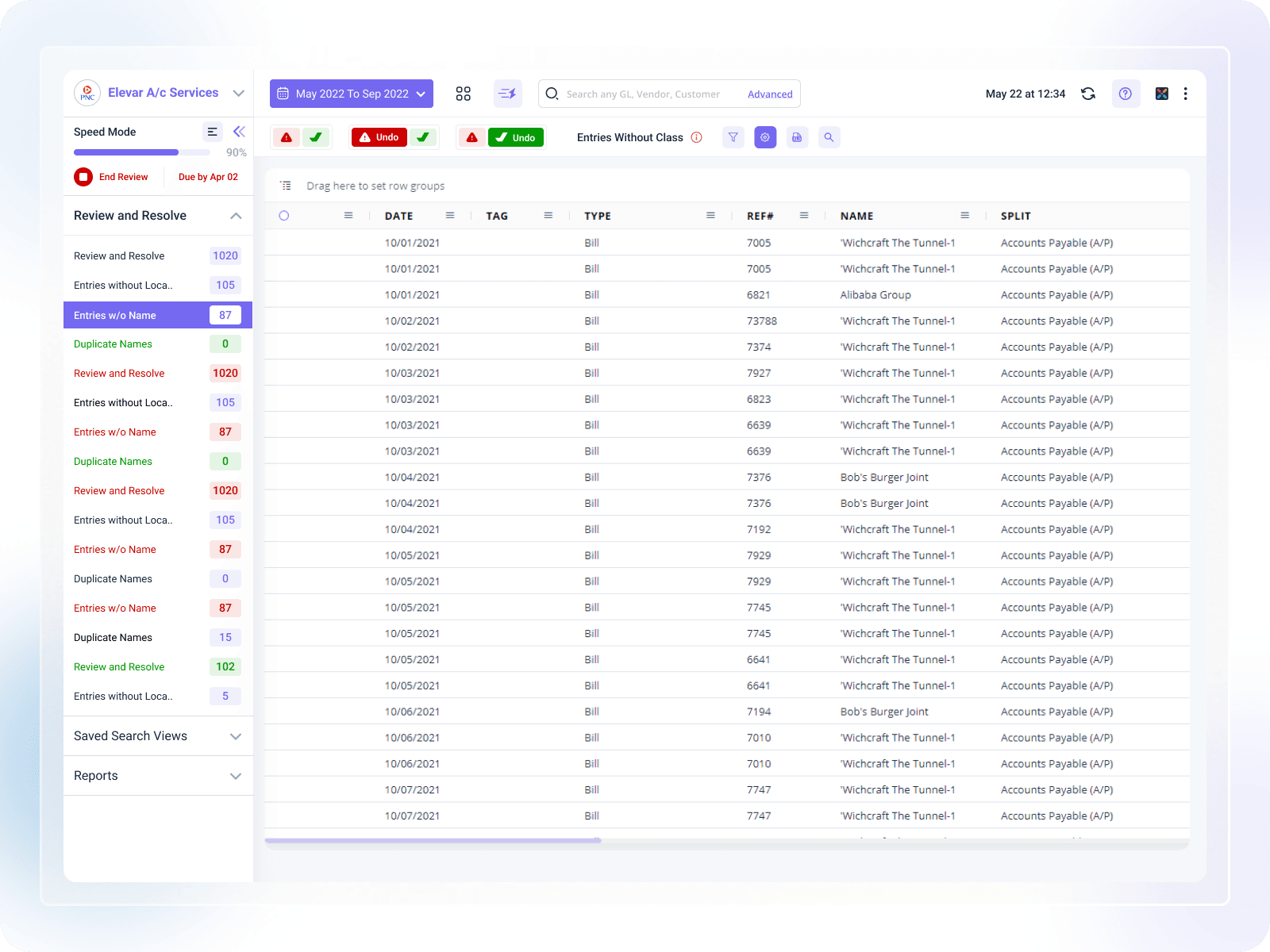
Before the redesign, Cleanup Mode (earlier known as Speed Mode) had a basic and unstructured layout. While it worked for simple reviews, it became difficult to use as data volume increased, making error identification and correction time-consuming.
Target Users
Primary User: Accountants / Bookkeepers / CPA
Works at:
Small & Medium Businesses
Accounting firms
Key Responsibilities:
Bookkeeping & reconciliation
Tax preparation
Financial reporting
Managing multiple clients
Client communication
User Pain Points
1. Errors During Data Entry
Manual entry leads to typos and wrong categorization
Often handled by interns or junior staff
2. Difficult Error Correction
Errors are buried in large datasets
Finding issues takes too much time
3. Deadline Pressure
Inefficient workflows delay book closing
Stress increases during peak seasons
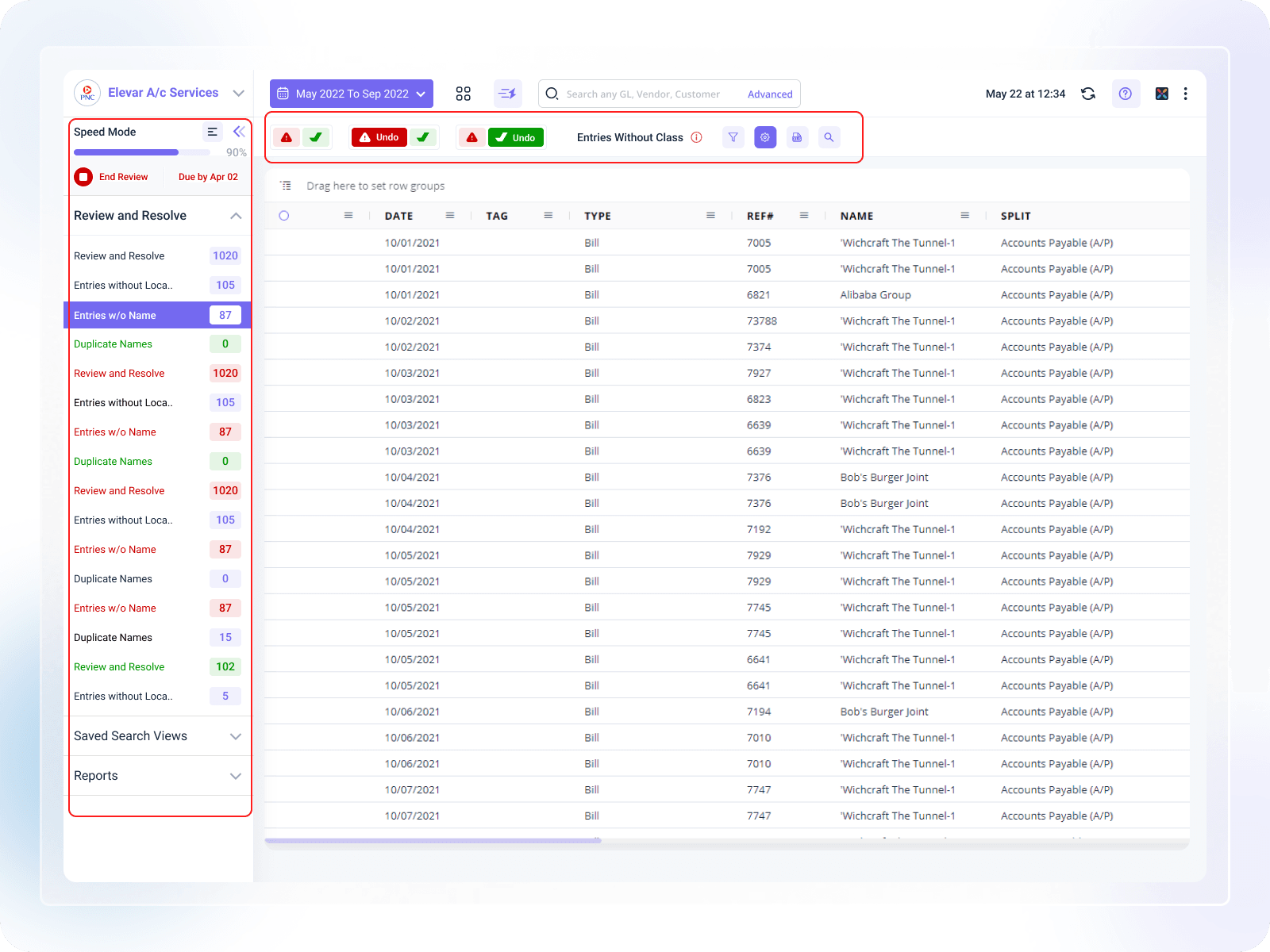
Context Before Redesign
Cleanup Mode was earlier known as Speed Mode
The first version was built by an external agency
When the in-house design team joined, the product needed:
Better structure
Scalability
Clear workflows for real accountant use cases
Speed Mode was later repositioned and redesigned as Cleanup Mode.
Design Steps
Heuristic Evaluation
Reviewed old Speed Mode using usability principles
Identified scalability and usability issues
User Journey Mapping
Mapped how accountants review and fix errors
Found friction points and delays
Low-Fidelity Prototypes
Focused on layout and functionality
Avoided visual polish at this stage
User Feedback
Stakeholder client calls
Customer support tickets
Insights from Microsoft Clarity & Mixpanel
Iterative Refinement
Improved designs based on real feedback
Continuous collaboration with dev, CS, and marketing teams
Key UX Improvements
1. Better Review Points Organization
Problem:
All review points were shown in one long list
Hard to find specific issues
Solution:
Grouped review points by error type
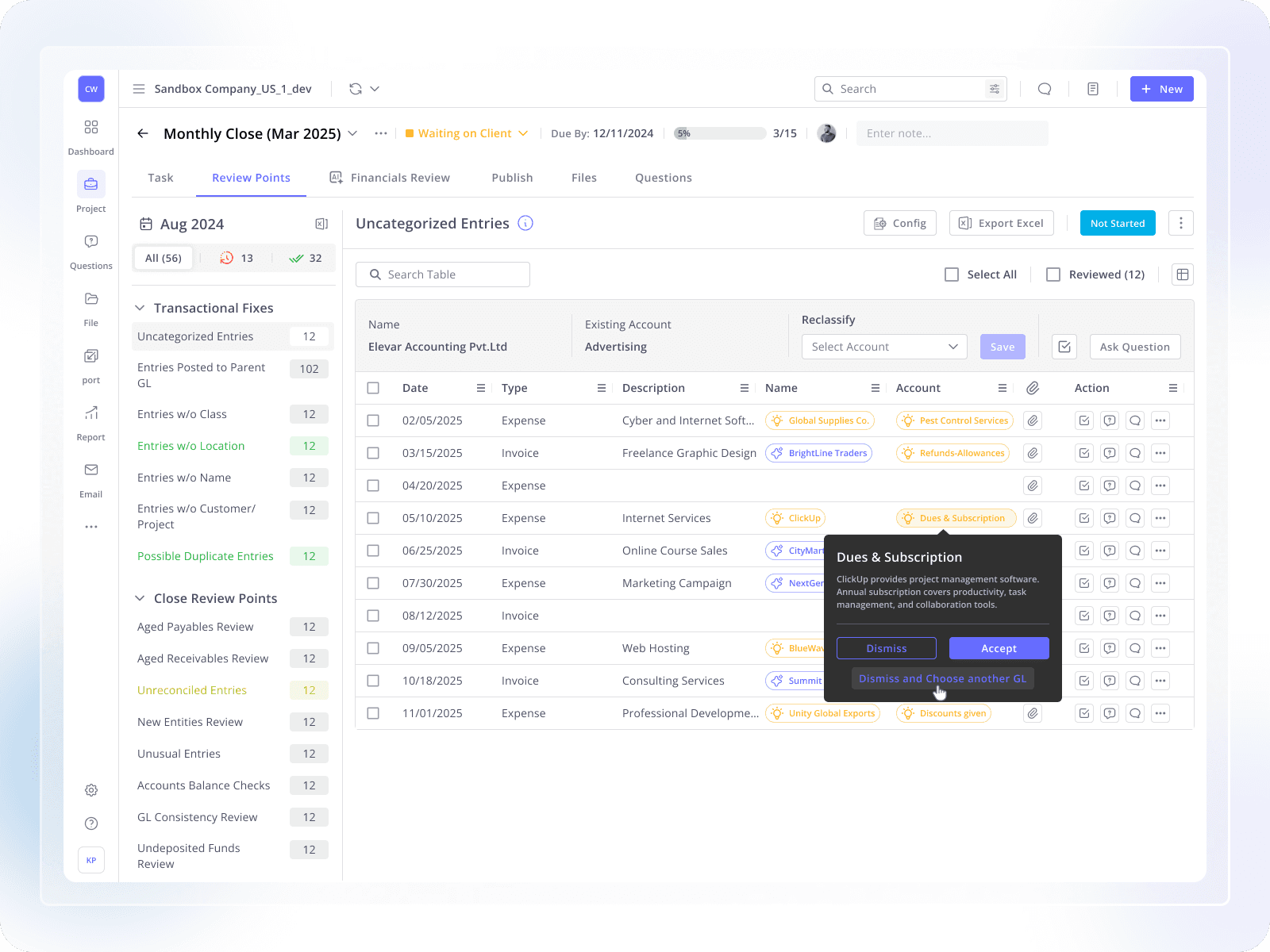
Uncategorized Entries
GL Consistency
New Entries
Added option to disable entire categories
Impact:
Faster navigation
More control for accountants
Less manual filtering
Visual & Accessibility Improvements
Problem:
Many accountants are 40+
Poor contrast and unclear icons affected usability
Solution:
Followed WCAG accessibility guidelines
Improved:
Color contrast
Font readability
Icon clarity
Impact:
Easier to use for all age groups
Reduced eye strain
More inclusive design
Results & Impact
After launching the redesigned Cleanup Mode:
More accountants started using Xenett
Book closing became faster
Transaction review took less time
Accuracy in work improved
AI-Powered Suggestions for Uncategorized Entries
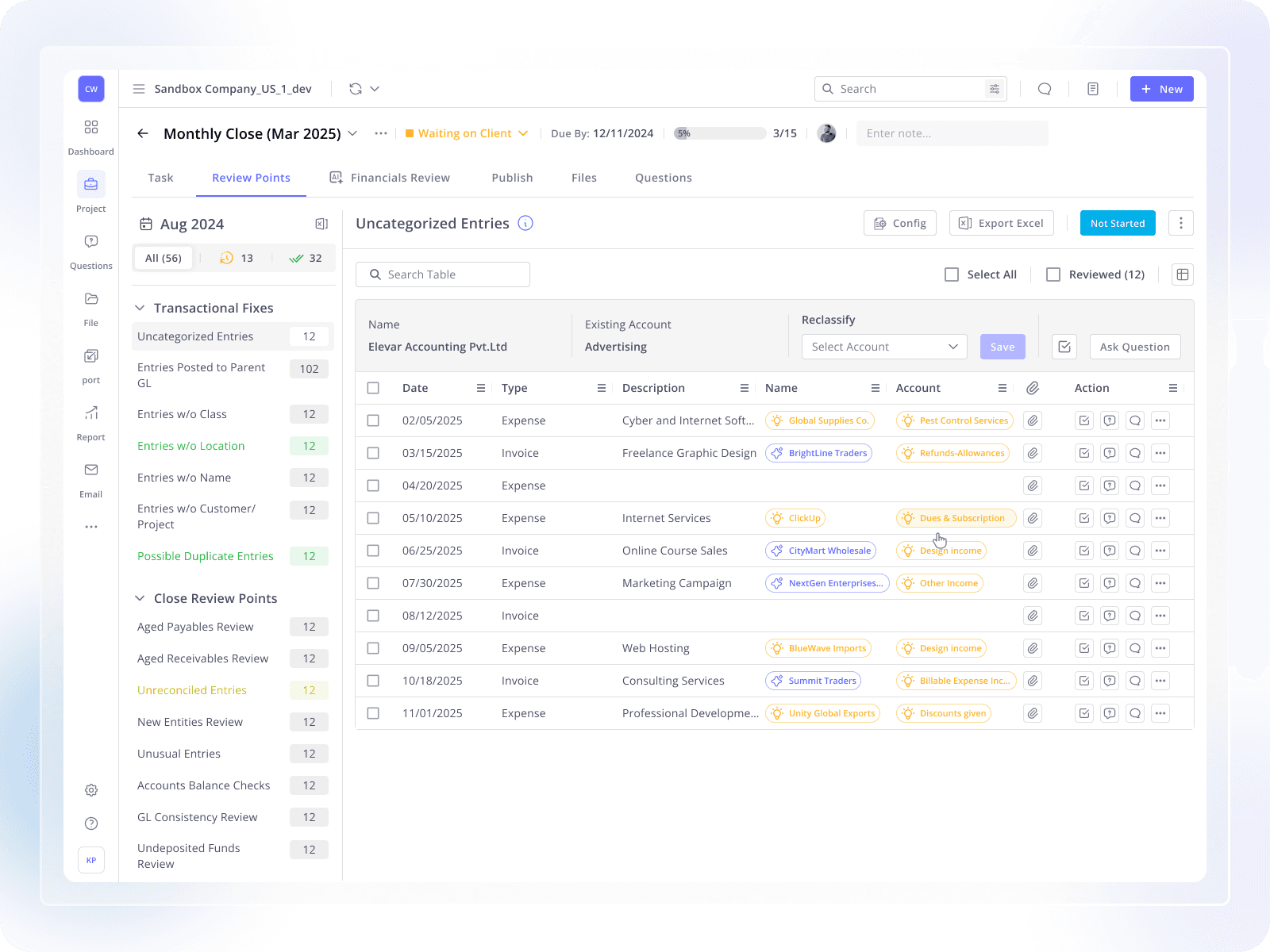
In the latest version of Cleanup Mode, we introduced AI-powered suggestions for uncategorized and incomplete entries.
Problem
When entries have:
Missing account
Missing name
Incorrect classification
Accountants had to manually decide where each entry should go. This slowed down the review process and increased the chance of mistakes.
Solution (AI Feature)
Cleanup Mode now uses AI to:
Analyze transaction details
Understand past accounting patterns
Suggest the most relevant account or name for each uncategorized entry
For every suggestion, users can:
Accept the suggested account
Dismiss the suggestion
Choose a different GL account if needed
This keeps the accountant fully in control while reducing manual effort.
How It Helps Users
Reduces decision-making time
Speeds up categorization of entries
Minimizes manual errors
Makes cleanup faster and more confident
AI acts as a smart assistant, not an auto-action, ensuring trust and accuracy in financial data.
