Project detail
Somlalit School App
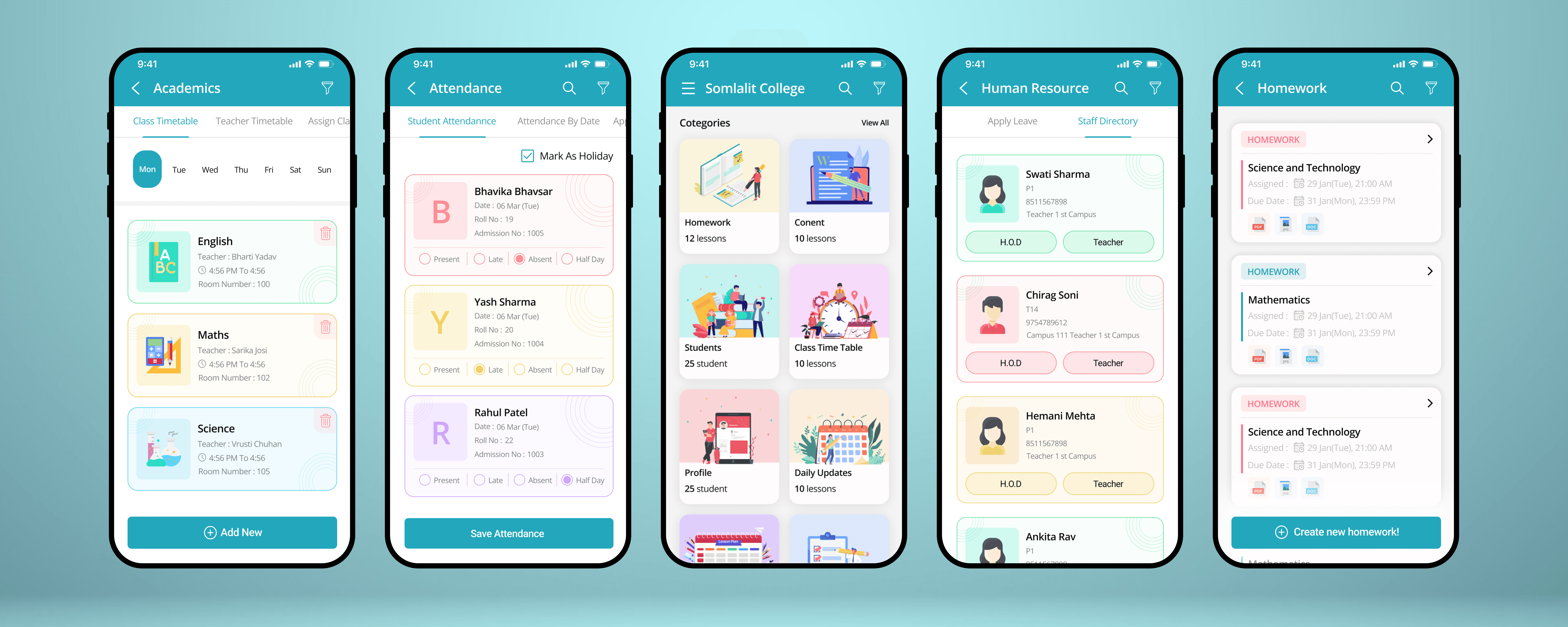
Somlalit School App is a mobile-first school management solution that helps teachers manage homework, attendance, leave, and class timetables efficiently through a simple and intuitive interface.
Mobile App
6 months
Somlalit School
Project Overview
The Somlalit School App was designed between 2020–2021 to support schools that were moving from manual processes to basic digital systems. I worked on this project as a UI/UX Designer, focusing on building a simple, practical, and teacher-first mobile experience.
The app helps teachers manage attendance, homework, leave, and class timetables from one place, keeping in mind the usability expectations and technical constraints of that time.e.
My Role
UI/UX Designer
I was responsible for:
Understanding teachers’ daily workflows and challenges
Designing clear user flows and screen structures
Creating wireframes and high-fidelity UI designs
Maintaining consistency and usability across the app
Tools Used: Figma, FigJam
Problem & Context (2020–2021)
During this period, most schools relied on manual registers or traditional ERP systems such as Fedena and MyClassboard. While these systems provided core functionality, they were often complex and not optimized for mobile use.
Teachers had limited time between classes and needed a solution that was fast, familiar, and easy to use during daily school operations.
UX Approach
Based on informal discussions with teachers and a review of similar school ERP apps available at the time, I focused on three key UX principles:
Speed: Reduce steps for high-frequency tasks
Clarity: Use simple layouts instead of feature-heavy screens
Consistency: Apply familiar patterns across all modules
Core User Flow
Teacher Flow: Login → Dashboard → Select task (Attendance / Homework / Academics / HR) → Complete task → Save
The navigation was intentionally kept flat to minimize cognitive load.
Key UX Decisions
Attendance Management
Color-coded attendance status (Present, Absent, Late)
Student details visible at a glance
Single primary action to save attendance
Homework & Timetable
Subject-wise homework cards with clear due dates
Day-wise structured timetable view for quick planning
These decisions helped teachers complete daily tasks quickly and with fewer errors.
Visual Design
Calm teal color palette to create trust and focus
Clean white backgrounds for better readability
Rounded cards and simple icons for a friendly experience
The UI was designed for frequent daily use without visual fatigue.
Outcome & Impact
Faster attendance marking compared to manual methods
Better organization of homework tasks
Improved acceptance among teachers who were new to digital tools
Within the 2020–2021 context, the app successfully supported schools during their digital transition.
Key Learnings
Teacher-focused products must prioritize speed and clarity
Simple UX decisions can create strong impact
Designing within real constraints leads to better adoption
Final Reflection
This project reflects my experience designing real-world, time-appropriate UX solutions. By focusing on actual user needs and practical constraints, I was able to create a usable and scalable school management experience for teachers.
——————————————————————————————————————————————
Live App:
This app was published on the Google Play Store during 2020–2021 and was actively used by schools at that time.
-> View App on Google Play
